| Support Category: User Account | Account Info Update Request |
| Specialist Notes: |
Users have the ability to update their account information. If they are unable to or have difficulties navigating, we can update it for them. This includes name, email address, division, etc. However, we should only choose options within 'CURE'.
While on the 'User Record' page, please click the 'Edit Record'. Then select the following options: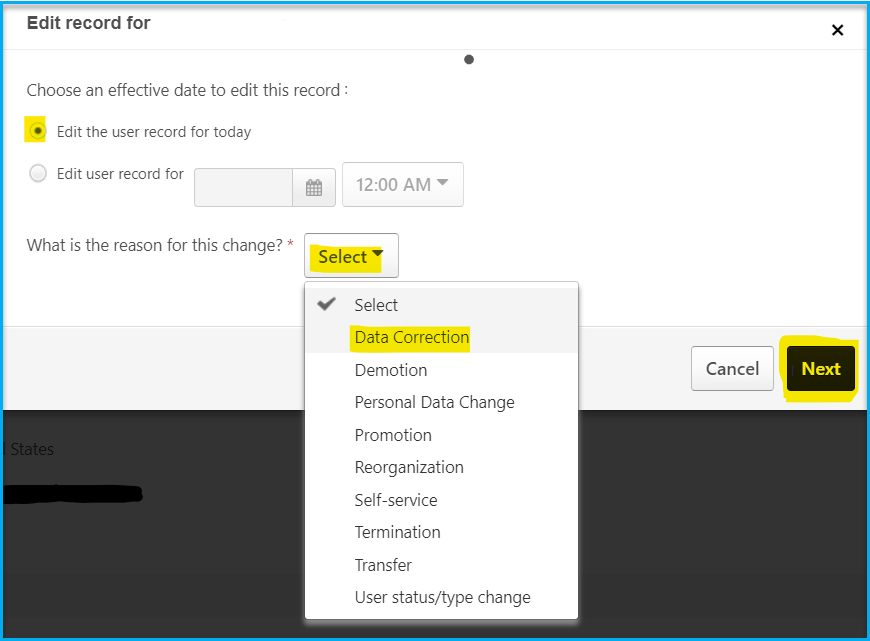
Should you need to update the Division, please click the X to remove the current division, then click to add. From the options, please click the plus sign to expand the options under CURE: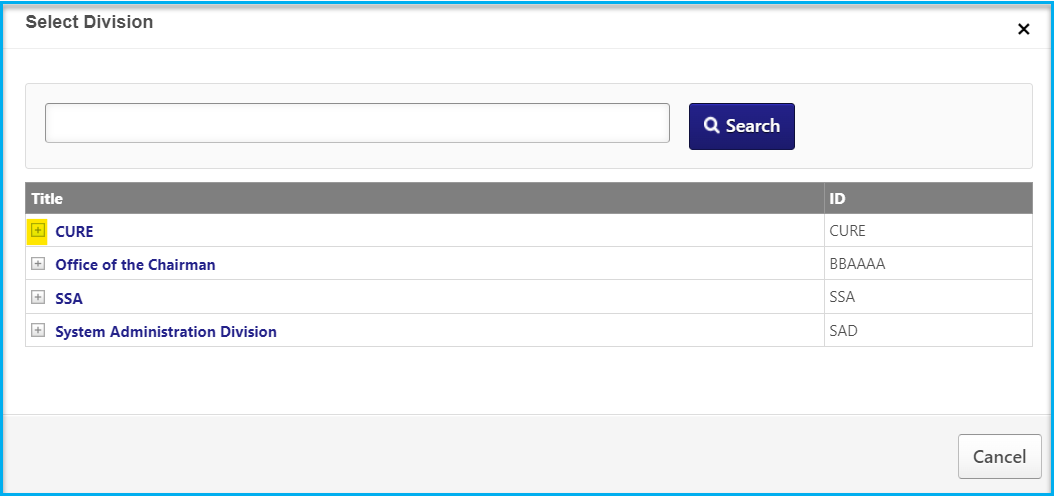
If you're unsure about the user's request, you may escalate to the Admins to confirm. (Example: user is asking to change division/position/location to something that does not appear to be under CURE)
| Standard Response: |
I'm sorry to hear that your NCUA CURE LMS account has incorrect information.
To update your account information, hover your cursor over the 'Profile' menu tab and click the 'Universal Profile' option, this will take you to your profile page. Then, kindly click the 'User Record' tab to view your account information. You should be able to update your information by clicking the 'Edit Record' button on the bottom right corner of the page.
If you are unable to update the desired information, please let me know. I can update it for you.
